This is the button-by-button reference for scoring an ice hockey game in StatsCastr: periods and the clock, what each button records, and the few habits that keep assists, penalty minutes and save percentage right. For an overview of what StatsCastr does for hockey, see the ice hockey page. In the app's sport lists, ice hockey is called Hockey.
Short version
Tap the team, the stat, then the player. Log assists with Assist (or on the goal later), add the player to a Penalty from the play log, and log a Shot on Goal for the shooter plus a Save for the goalie's team on every save. Tap + between periods and type the clock as you go.
Periods, overtime and the clock
Pick the ruleset when you create the league, or for a single game on the new game form (see Rulesets for each sport, and changing one for a single game):
| Ruleset | Periods | Overtime |
|---|---|---|
| Standard Ice Hockey | 3 × 20:00 | 5:00 |
| Youth Ice Hockey | 3 × 15:00 | 5:00 |
- Periods show as P1, P2, P3, then OT and OT2. + goes up to OT2, and − goes back.
- Each time you change period, the clock box resets to the period length, or to 05:00 in overtime.
- The clock doesn't run on its own. Type the time off the rink clock, like 12:34, and it saves when you leave the box. Every play is stamped with the time in the box. A time longer than the period isn't saved: you'll see Check the clock, and the box goes back to its last saved time.
See Change the period and set the clock.
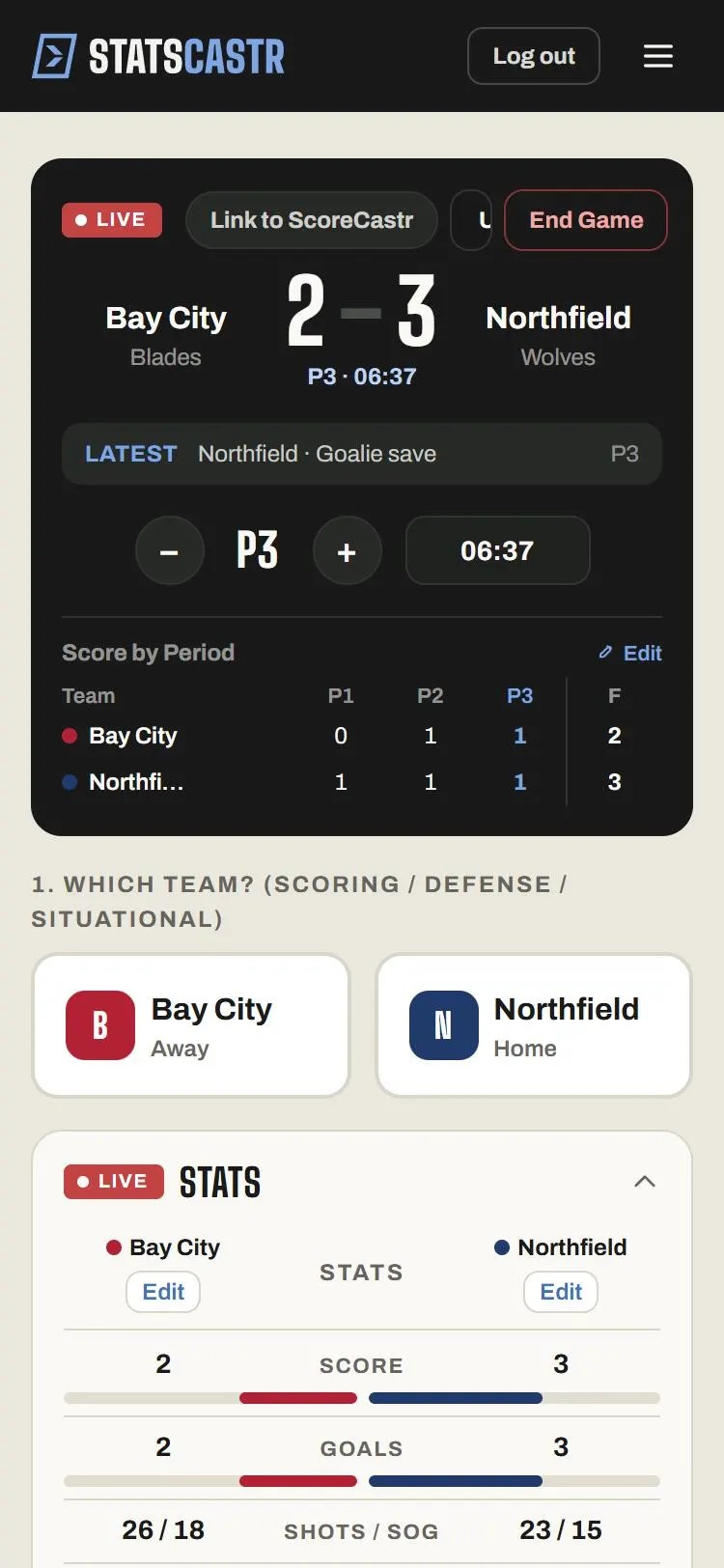
The stat buttons
Tap the team the stat belongs to, then the button. Every button except Penalty and Score Adjust opens Select player (optional): tap the player, or Skip to log it for the team only. Goal and PP Goal show +1 pts.
| Button | What it records |
|---|---|
| Goal | A goal and a point for the scorer |
| PP Goal | The same, plus a power-play goal |
| Assist | An assist and a point |
| Shot | A shot that missed the net or was blocked |
| Shot on Goal | A shot and a shot on goal |
| Hit | A hit |
| Block | A blocked shot, for the player who blocked it |
| Faceoff Win / Faceoff Loss | Faceoffs and faceoff percentage |
| Penalty | Opens Penalty minutes: 2 minutes, 4 minutes, 5 minutes or 10 minutes |
| Save | A save, for the goalie's team |
| Score Adjust | Opens Score adjustment: +1 goal or -1 goal |
Goals and assists
The goal panel asks only for the scorer. Credit assists one of two ways, not both:
- Right away: with the scoring team still selected, tap Assist and pick the player. Repeat for a second assist.
- Later: tap Edit on the goal in the play log and fill in First assist and Second assist.
A goal doesn't count as a shot by itself. If you want shots on goal to include goals, the usual hockey count, also log Shot on Goal for the scorer.
Scored on the power play but tapped Goal? Edit the play and change the Event to Power-play Goal.
Penalties
Penalty goes straight to the minutes, with no player step, so it counts for the team only. To give it to a player, tap Edit on the penalty in the play log and pick the Player. Do this if you want penalty minutes (PIM) in the player stats and the season leaders. You can also change Penalty minutes there, from 1 to 60.
Shots and saves
Save percentage is saves divided by saves plus goals against. It only shows once the other team has at least one Shot on Goal, so for each save:
- Tap the shooting team, Shot on Goal, and the shooter.
- Tap the goalie's team, Save, and the goalie.
What the box score shows
- Team stats: Score, Goals, Shots / SOG, Power-play goals, Hits, Blocks, Faceoffs (wins out of total), Penalties / min, Saves / SV%.
- Player stats: Scoring (G, A, PTS, PPG), Shooting (SH, SOG, HIT, BLK), Faceoffs & Penalties (FOW, FOL, FO%, PEN, PIM) and Goaltending (SV).
- Standings: W, L, T, PCT, GF and GA (goals for and against) and STK.
- Season leaders: Points / Game, Goals / Game, Assists / Game, Shots on Goal / Game, Saves / Game, Penalty Minutes / Game.
Logged something wrong? Undo takes back the last play, and Edit on any play-log row changes the event, player, period, clock or assists. See Edit or delete any play, during or after the game and Log stats live.
Checklist
- Ruleset set to Standard Ice Hockey or Youth Ice Hockey
- Clock typed in at each stoppage you want stamped on plays
- Assists logged once per goal, by button or by edit
- Each penalty edited to add the player, if you track PIM
- Every save paired with the shooter's Shot on Goal