This is the button-by-button reference for scoring a field hockey game in StatsCastr: quarters and the clock, what each button records, and what ends up in the box score. For an overview of what StatsCastr does for field hockey, see the field hockey page.
Short version
Tap the team, the stat, then the player (or Skip for a team stat). Log assists with the Assist button, pair each Save with the shooter's Shot on Goal, type the clock as you go, and tap + at the end of each quarter.
Quarters and the clock
Field hockey has two rulesets, both four 15-minute quarters:
- US High School Field Hockey (the default)
- FIH / International Field Hockey
You pick one when you create the league, or for a single game on the new game form. See Rulesets for each sport, and changing one for a single game.
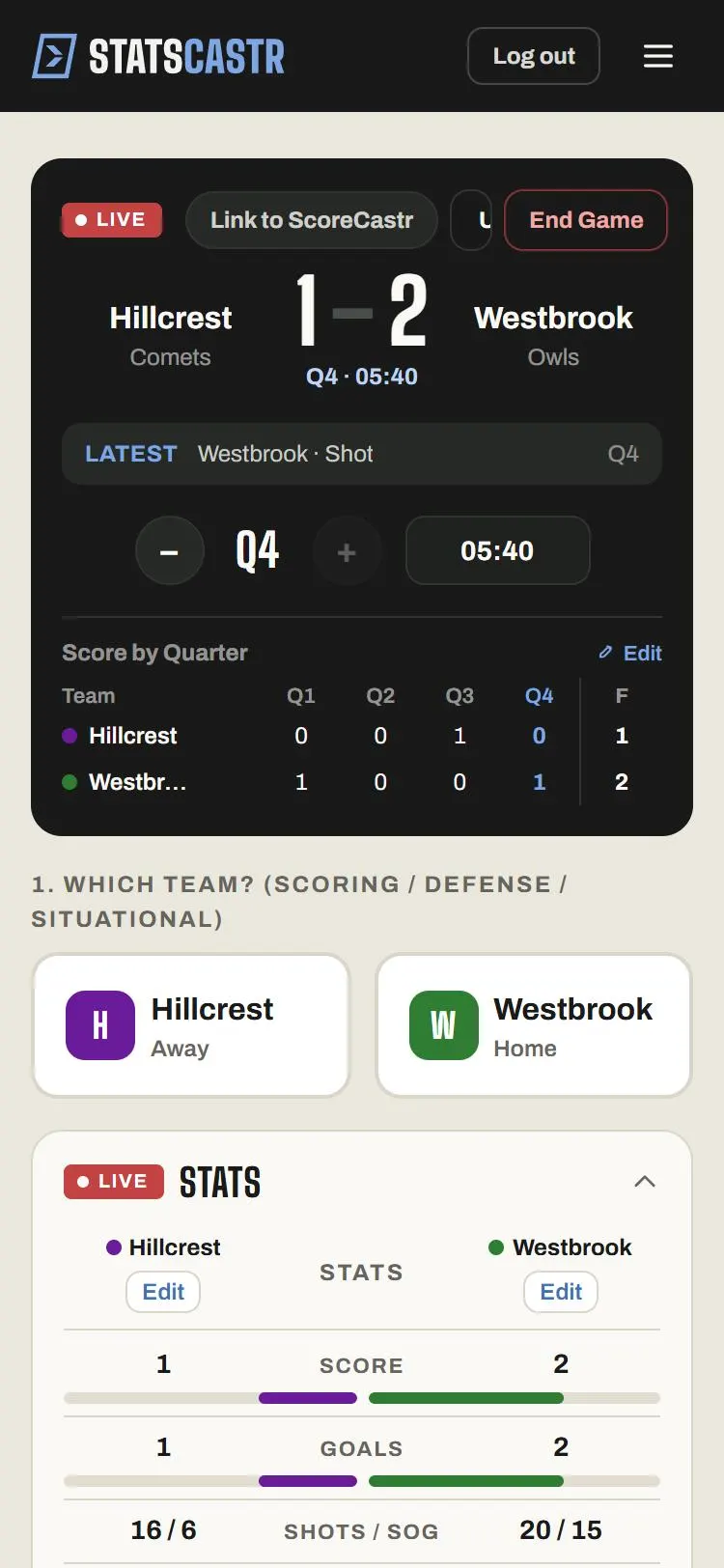
- Quarters show as Q1 to Q4. + moves to the next quarter and − goes back.
- + stops at Q4 and greys out there. There's no overtime period on the Live page yet, so log any overtime plays in Q4.
- The clock box resets to 15:00 each quarter. It doesn't run on its own: type the time from the game clock, like 08:30, and it saves when you leave the box. A time over 15:00 isn't saved: you'll see Check the clock, and the box goes back to its last saved time.
See Change the period and set the clock.
The stat buttons
Tap the team the stat belongs to, then the button. Every button except Score Adjust opens Select player (optional): tap the player, or Skip to log it for the team only. Goal shows +1 pts.
| Button | What it records |
|---|---|
| Goal | A goal and a point for the scorer |
| Assist | An assist and a point |
| Shot | A shot off target or blocked |
| Shot on Goal | A shot and a shot on goal |
| Save | A save, for the goalkeeper's team |
| Penalty Corner | A penalty corner for the team that earned it |
| Foul | A foul |
| Green Card, Yellow Card, Red Card | A card of that color |
| Score Adjust | Opens Score adjustment: +1 goal or -1 goal |
Goals and assists
The goal panel asks only for the scorer. For the assist, keep the scoring team selected, tap Assist and pick the player.
Use the button for assists. When you edit a goal in the play log you'll also see an Assist field, but an assist entered there doesn't add to the assist totals yet.
A goal doesn't add a shot on its own. If you want goals counted in shots and shots on goal, log a Shot on Goal for the scorer as well.
Saves and corners
Save percentage is saves divided by saves plus goals against. To get both the save and the shot into the stats, log both sides:
- Tap the shooting team, Shot on Goal, and the shooter.
- Tap the defending team, Save, and the goalkeeper.
Penalty Corner counts for the team awarded the corner. Picking a player is optional; if you do, it shows in that player's PC column and in the season's corner leaders.
What the box score shows
- Team stats: Score, Goals, Shots / SOG, Assists, Penalty corners, Fouls, Cards (G/Y/R), Saves / SV%.
- Player stats: Scoring (G, A, PTS), Shooting & Set Pieces (SH, SOG, PC), Goalkeeping (SV), Discipline (FL, GC, YC, RC).
- Score by Quarter: the goals in each quarter, with Edit to override them. See Override the score by period.
- Standings: W, L, T, PCT, GF and GA (goals for and against) and STK.
- Season leaders: Points / Game, Goals / Game, Assists / Game, Shots on Goal / Game, Saves / Game, Penalty Corners / Game.
Fixing plays
Undo takes back the last play. Edit on any play-log row changes the event (a Shot to a Shot on Goal, say), the player, the quarter or the clock. See Edit or delete any play, during or after the game and Log stats live.
Checklist
- League or game set to the right ruleset
- Clock typed in when you want plays stamped with the time
- Assists logged with the Assist button
- Each Save paired with the shooter's Shot on Goal
- + tapped at the end of each quarter