ScoreCastr runs the scoreboard graphics on your stream. StatsCastr keeps the play-by-play stats. Link the two and every stat you log in StatsCastr shows up in ScoreCastr's player stats and halftime stats graphics. ScoreCastr keeps control of the score and clock, so one person can run the scoreboard while another keeps stats.
Short version
In ScoreCastr, open the match and tap Link StatsCastr to get a code. In StatsCastr, tap Link to ScoreCastr on the game (or Link from ScoreCastr on Games), enter the code, tap Continue, check the game and team sides, and tap Link game.
What you need
- A ScoreCastr Pro plan. Linking to StatsCastr is part of Pro.
- A ScoreCastr match and a StatsCastr game of the same sport. Linking works for basketball, football, soccer, volleyball, ice hockey, field hockey, tennis, baseball and softball. ScoreCastr doesn't score lacrosse yet, so there's no lacrosse match to link, even though StatsCastr shows the button on lacrosse games.
- A StatsCastr game that isn't final. If you haven't created one, you can create it from the match while you link. See Create a game from a ScoreCastr match.
For a game that should count in your season, schedule it in StatsCastr first (with the season selected), then link it. A game created from the match is always a scrimmage.
1. Get a code from ScoreCastr
- In ScoreCastr, open the match and go to its StatsCastr tab (labelled Stats on a phone).
- Tap Link StatsCastr.
- ScoreCastr shows a QR code and an 8-character code, such as K7Q2-M9XD. The code lasts 10 minutes.
2. Enter the code in StatsCastr
Pick whichever is easiest:
- On the game: open the game's page or its Live page and tap Link to ScoreCastr in the dark score panel. Type the code and tap Continue.
- From the menu: tap Link from ScoreCastr on Games or the dashboard, type the code under Link code from ScoreCastr, and tap Continue.
- With the QR code: point your phone's camera app at the QR code on the ScoreCastr screen and open the link. It goes to statscastr.co/link with the code already filled in and accepted. (There's no scanner inside StatsCastr; your phone's camera does the work.) If you're signed out, tap Log in to continue first; the code is kept.
Dashes and spaces don't matter, and the letters I, L, O and U are never used, so a code is always letters and numbers like K7Q2M9XD.
If the server has been asleep, the button reads Connecting… and then "Waking up the server. This can take up to a minute." Wait; don't tap again.
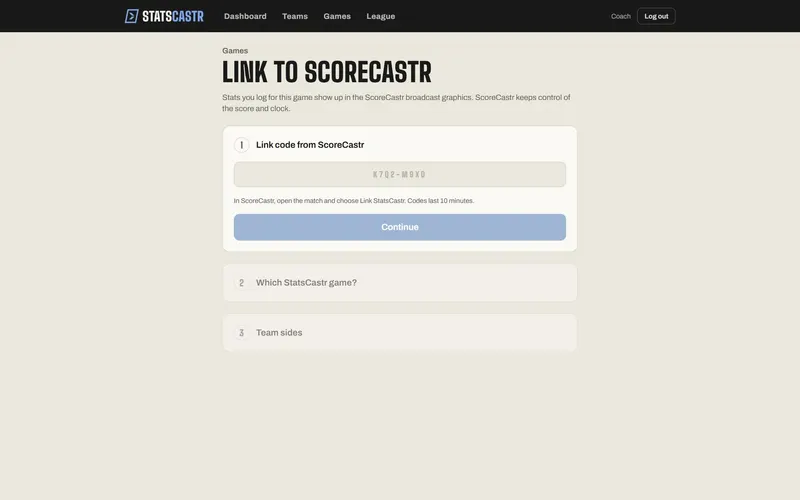
3. Choose the game and the sides
Once the code is accepted, step 1 shows Code accepted and the ScoreCastr match with its Home and Away teams.
- Under Which StatsCastr game?, pick your game. The list shows your games of the same sport that aren't final, as "Away at Home" with Live, a date or Scheduled. If you started from a game's Link to ScoreCastr button, that game is already picked; otherwise StatsCastr picks the one whose team names match, if any.
- Under Team sides, check that each ScoreCastr team lines up with the right StatsCastr team, for example ScoreCastr home → StatsCastr Westfield. If they're crossed, tap ⇄ Swap.
- Tap Link game.
You'll see Linked to ScoreCastr: "Stats you log now show up in ScoreCastr's graphics." StatsCastr sends the current stats straight away, and every new play within about a second.
If the game hasn't started yet, you land on its page: tap Start Game, then Track Stats when play begins. A live game opens straight on its Live page.
Good to know
- Get the sides right. Swapped sides would put your home team's stats on the away team's graphics.
- One game links to one match. Linking a game that's already linked replaces the old link.
- Leaving the link page before you tap Link game gives the match back to ScoreCastr. The code is used up by then, so make a new one to try again.
- Use another code starts over with a different code.
- Linking doesn't change the score in either app. ScoreCastr's scoreboard always shows ScoreCastr's score.
Once linked, the game shows a ScoreCastr · Live chip. See The ScoreCastr chip. If something goes wrong, see Fix ScoreCastr link errors.
Checklist
- ScoreCastr Pro, and a match of the same sport as your game
- Season game scheduled in StatsCastr first, if it should count
- Code entered within 10 minutes, or the QR code opened with your camera
- Right game picked under Which StatsCastr game?
- Team sides checked, with ⇄ Swap if needed
- Link game tapped and ScoreCastr · Live showing on the game