This is the reference for scoring a basketball game in StatsCastr: the rules your game follows, every button on the stat pad, and where each stat ends up. For what the app does for basketball overall, see the basketball page.
Short version
Tap the team, then a button such as 2PT Made, then the player in Select player (optional) (or Skip). Made shots add points; misses, rebounds and the rest build the box score. Team Foul logs at once, and Score Adjust fixes the score by one point.
Rules, periods and the clock
The game uses the ruleset from your league, or the one picked for this game when it was scheduled. See Rulesets for each sport.
| Ruleset | Periods | Clock | Overtime |
|---|---|---|---|
| High School Regular Season | 4 quarters (Q1 to Q4) | 8:00 | 4:00 |
| College Regular Season | 2 halves (1H, 2H) | 20:00 | 5:00 |
- Tap + to move to the next period. The clock resets to the period length, or to the overtime length in overtime.
- After regulation, + adds overtime periods labelled OT and OT2. It stops at OT2.
- The clock doesn't run on its own. Type the time remaining, such as
4:12, in the box next to the period. It saves when you leave the box, and each play you log is stamped with it.
Type the clock as minutes and seconds, and never more than the period length (for example, no more than 8:00 in a high school quarter). StatsCastr tidies the time when you leave the box (4:12 becomes 04:12). If the time isn't a real time or is longer than the period, you'll see Check the clock and the box goes back to its last saved time. See Change the period and set the clock.
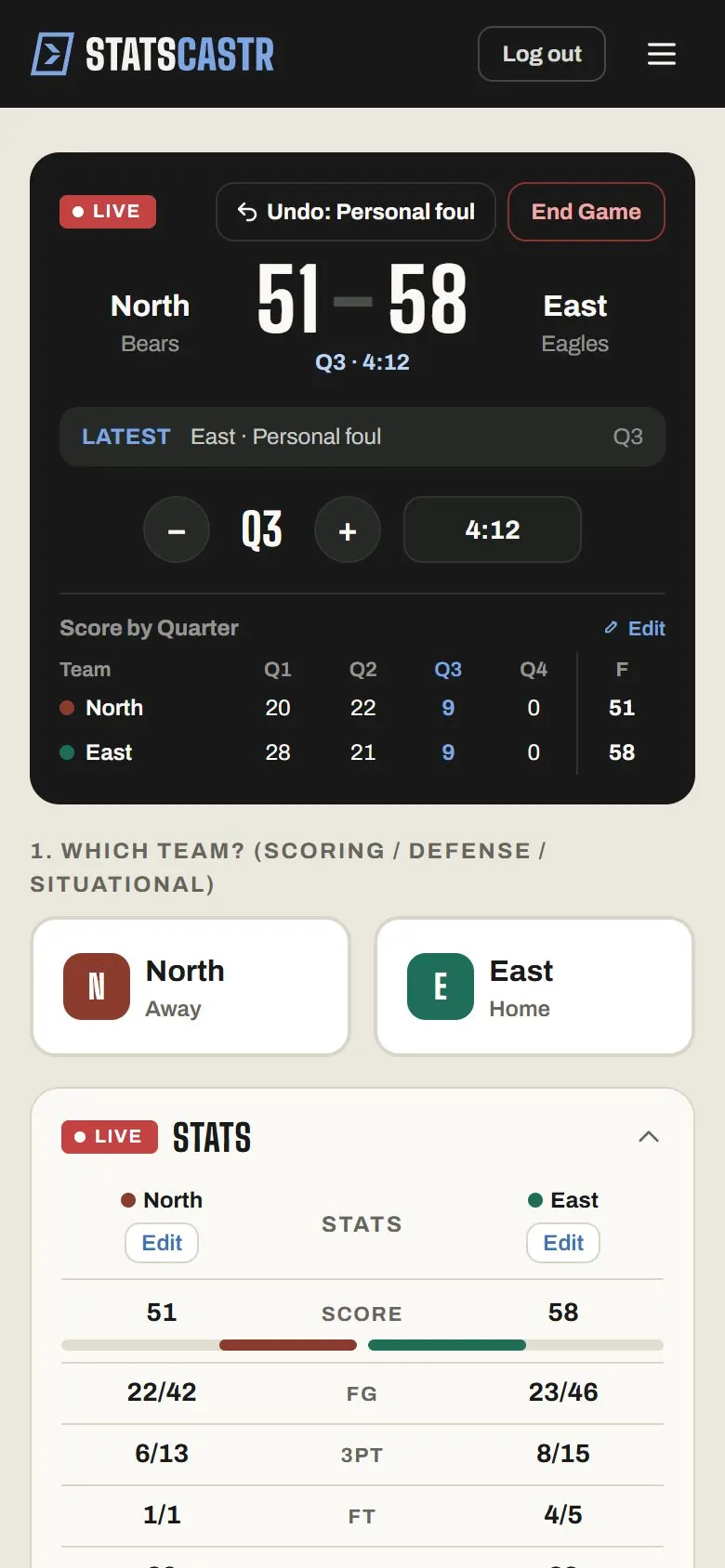
The stat buttons
Tap 1. Which team?, then a button under Quick stats. The team stays picked until you tap the other one, so a run of plays by one team is one tap each plus the player.
| Button | Records | Then asks |
|---|---|---|
| 2PT Made | 2 points, a made two and a field goal | Player |
| 2PT Miss | A missed two (a field goal attempt) | Player |
| 3PT Made | 3 points, a made three and a field goal | Player |
| 3PT Miss | A missed three (a field goal attempt) | Player |
| FT Made | 1 point and a made free throw | Player |
| FT Miss | A missed free throw | Player |
| Off Reb / Def Reb | An offensive or defensive rebound | Player |
| Assist | An assist | Player |
| Steal | A steal | Player |
| Block | A blocked shot | Player |
| Turnover | A turnover | Player |
| Personal Foul | A personal foul | Player |
| Team Foul | A team foul | Nothing: it logs at once |
| Score Adjust | One point up or down | +1 point or -1 point |
The player panel is titled Select player (optional). Tap the player (shown as number and name), tap Skip to log it as a team stat with no player, or Cancel to log nothing.
Who gets each stat
- An assist is its own play. After a made basket, tap Assist for the same team and pick the passer.
- Log stats for the team that made the play. A steal is two plays: Steal for the defending team, and Turnover for the team that lost the ball, if you want both.
- Block goes to the blocker's team. The shooter's miss is a separate 2PT Miss or 3PT Miss for the other team.
- Use Score Adjust only when the scoreboard and the official book disagree. It changes the score without adding a shot to anyone's line.
What goes in the box score
The LIVE Stats panel and the box score show these team rows, away on the left and home on the right:
Score, FG (made/attempted), 3PT, FT, Rebounds, Assists, Turnovers, Steals, Blocks and Team Fouls.
Team Fouls counts only Team Foul taps, not personal fouls. Personal fouls show for each player under PF.
Player stats come in three groups:
| Group | Columns |
|---|---|
| Scoring | PTS, 2PM, 2PA, 3PM, 3PA, FTM, FTA, FG% |
| Rebounding | ORB, DRB, REB |
| Other | AST, STL, BLK, TO, PF |
FG% counts twos and threes, not free throws. Plays logged with Skip count for the team but not for any player.
Standings and season leaders
Basketball standings show W, L, T, PCT, PF (points for), PA (points against) and STK (streak). See How standings work.
The season page's stat leaders, counted from final games only:
- Points / Game, Rebounds / Game, Assists / Game, Steals / Game, Blocks / Game, Turnovers / Game
- Field Goal %, 3-Point %, Free Throw %
A player's per-game numbers count the games they recorded a stat in. See Season stat leaders for each sport.
Fixing mistakes
- Undo at the top of the scoreboard takes back the last play.
- In the play log, Edit opens Correct basketball event. In basketball you can change the Event itself (a 2PT Made into a 3PT Made, say), as well as the team, period, player and clock. Totals and the score recalculate.
- The Edit link on Score by Quarter (or Score by Half) overrides the period scores. Fixing the plays is usually better, since that keeps the box score and the score in step.
Basketball has no team-stat edit form: every team total comes from the plays. See Edit or delete any play, during or after the game.
Tips for the bench
- Log the shot first, then the rebound. The play log reads like the game.
- Logging the opponent's players needs their roster. Without it, use Skip and their team totals still add up.
- Wait for Saving… to clear before the next tap. A second tap too soon shows Saving previous stat.
Checklist
- Right ruleset for the game (high school or college)
- Clock typed as minutes and seconds, within the period length
- Each shot logged as made or missed, with the shooter
- Assists logged as their own play after the basket
- Scoreboard checked against the book at each break