A game moves one way: scheduled, then live, then final. Start Game makes it live so you can log stats and fans can follow. End Game makes it final, so it counts in standings and the box score is ready to share. There's no going back a step, so it's worth knowing which button does what.
Short version
At game time, tap Start Game, then Track Stats. At the final whistle, tap End Game on the Live page and confirm End the game and mark it Final?. You can still fix any play afterwards, but you can't add new ones or reopen the game.
Start a game
You can start a game from two places:
- Games list: tap Start Game on the game's card.
- The game's page: open the game and tap Start Game in the score panel.
Neither asks you to confirm: the game goes live straight away. Then tap Track Stats to open the Live page and start logging. See Log stats live.
Once a game is live:
- it gets a Live badge and moves to the top of your dashboard, with Track Stats and Fan link
- its date, time and location are locked
- its public game page shows the live score, so it's a good moment to share the Fan link. See Share the live game link.
Start it at game time
Start the game when it actually begins, not the night before. Once started, a game can't go back to scheduled, and its schedule can no longer be changed.
If Start Game seems to do nothing, check your connection and reload the page. The button doesn't show an error when it can't reach the server.
End a game
The safest place to end a game is the Live page:
- Tap End Game at the top right of the scoreboard.
- Confirm End the game and mark it Final? with OK.
- The game's Box score page opens.
You can also end a game without opening it, but these two buttons don't ask first, so be careful with them:
- End Game on the game's card in the Games list
- End Game in the score panel on the game's page
When a game ends, StatsCastr adds up the totals one last time. The final score then counts in your season's standings and stat leaders (unless it's a scrimmage), and the dashboard moves it to Recent finals.
If the game still shows Live after you tap End Game, your connection probably dropped. Reload the page and tap it again.
After the final
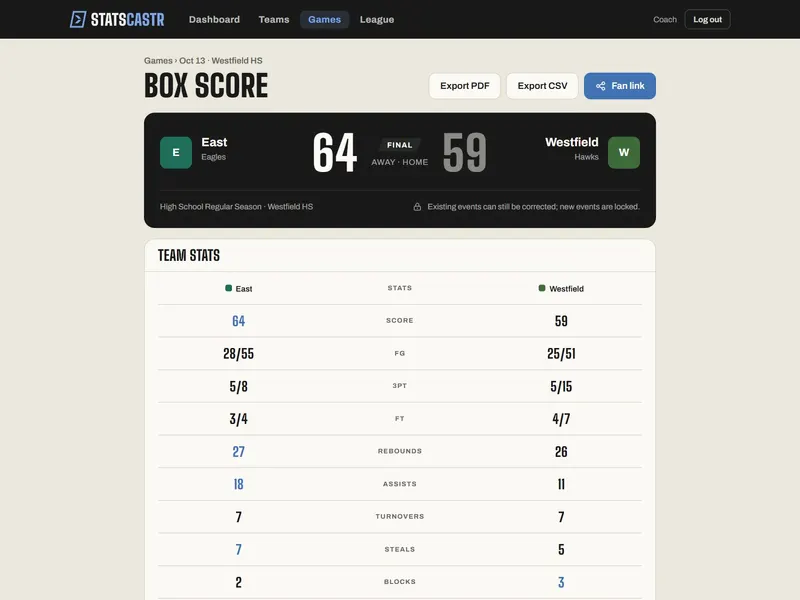
The game's page now reads Box score, with a Final plate and this note: "Existing events can still be corrected; new events are locked."
That means:
- You can edit or delete any play in the play-by-play. The score, team stats, player stats and standings rebuild on their own. See Edit or delete any play.
- You can't log new plays. If you try, StatsCastr says the game is complete and asks you to edit or delete an existing event instead.
- You can't reopen the game. There's no undo for End Game, so only end a game when it's over. If you end one by mistake mid-game, email info@eightyfivecreative.com with the game's link and we'll help.
Download the box score with Export PDF or Export CSV. See Download a PDF or CSV box score.
Checklist
- Start Game tapped at game time, not before
- Track Stats opened and the Fan link shared
- End Game tapped on the Live page and confirmed at the final
- Box score checked, and any wrong plays corrected
- PDF or CSV downloaded if you need one