This is the reference for scoring a volleyball match in StatsCastr: how rally scoring decides who gets each point, every stat button, and how sets and the match finish. For what StatsCastr does for volleyball overall, see the volleyball page.
Short version
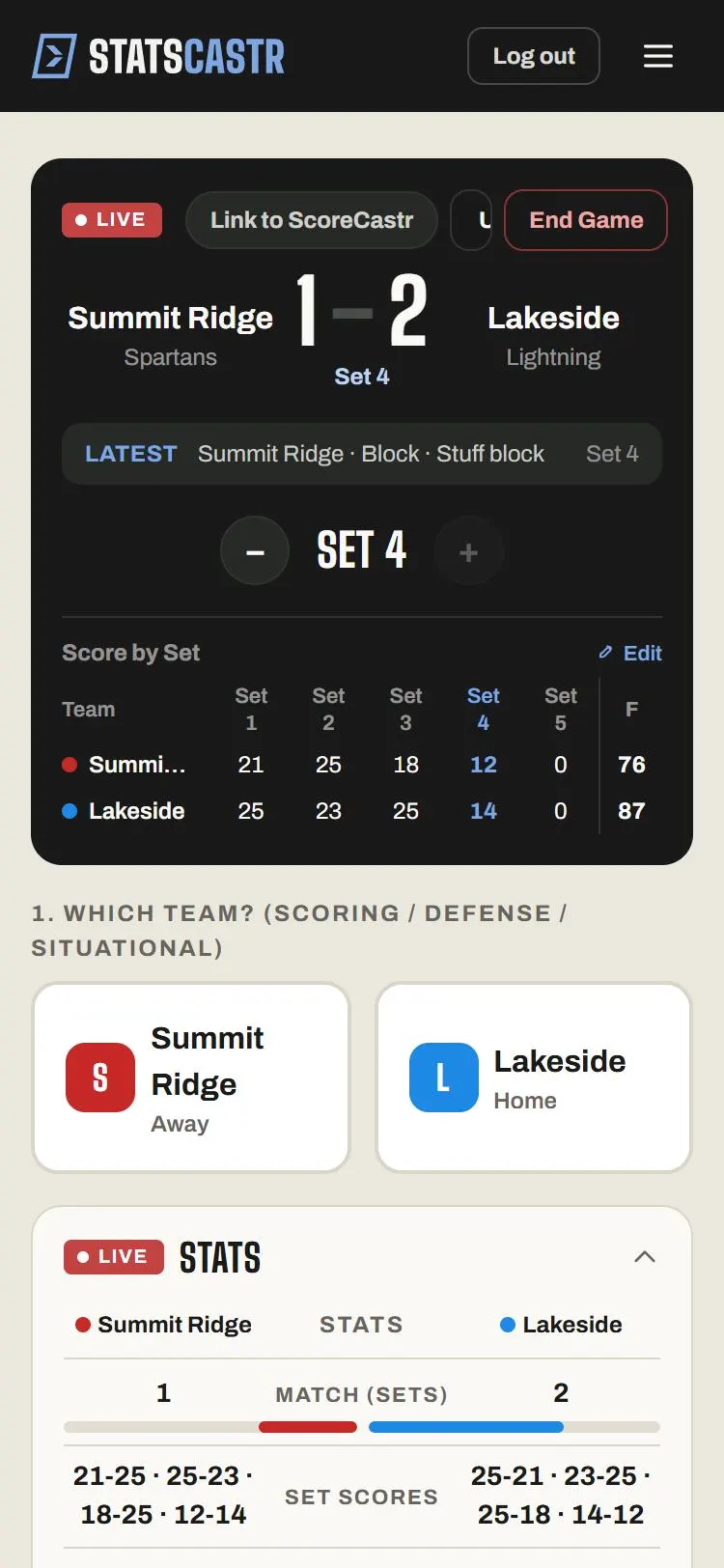
Tap the team that made the play, then the stat, then the player or Skip. Point Won, Kill, Ace and Block score for that team; an error scores for the other team. Tick Same rally as the last point (no point) when an error belongs to a rally you already scored.
Sets and the match
The match follows your league's ruleset, or the one picked for this match when it was scheduled. See Rulesets for each sport.
| Ruleset | Match | Sets |
|---|---|---|
| Indoor Best of Five | First to 3 sets | To 25; set 5 to 15 |
| Indoor Best of Three | First to 2 sets | To 25; set 3 to 15 |
Every set needs a two-point lead.
- Volleyball has no game clock. The period reads Set 1, Set 2 and so on.
- When a set is won, tap + to start the next one. Until then + is greyed out. If it stays grey when the set looks over, a point is missing or logged for the wrong team: check the play log.
- When a team wins the match, StatsCastr marks it Final on its own and opens the Box score page. You don't need to tap End Game.
See Change the period and set the clock.
Rally scoring: who gets the point
Every new volleyball match uses rally scoring: every rally ends in a point for one team. Tap the team that made the play, even when it's a mistake.
| Play | Tap this team | Point goes to |
|---|---|---|
| Point Won, Kill, Ace, Block | The team that won the rally | That team |
| Attack Error, Service Error, Block Error, Reception Error, Ball Handling, Net Violation | The team that made the error | The other team |
| Attack, Serve, Dig, Assist, Block Assist, Substitution, Timeout | The team that made the play | Nobody |
Point Won is for a rally you want on the scoreboard without a stat for anyone, such as a point awarded by the referee.
Same rally, no point
Some rallies produce two stats: an ace and the receiver's error, or a stuff block and the hitter's error. Log both, but only one should score.
- Log the point first, for example Ace for the serving team.
- Tap the other team, then Reception Error.
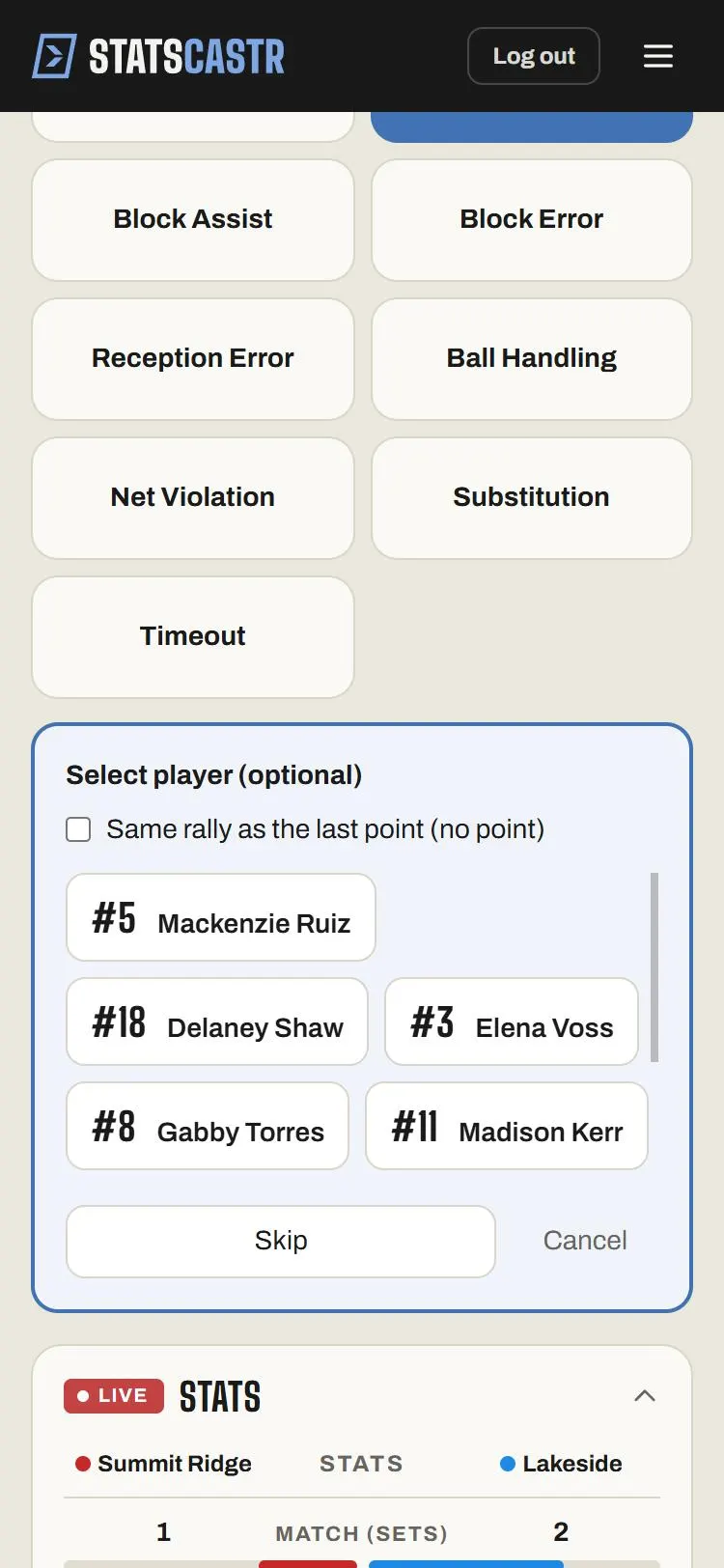
- In the player panel, tick Same rally as the last point (no point), then tap the player (or Skip).
The error counts in the box score but adds no point. The tick box shows on the six error buttons only.
The stat buttons
Every button except Timeout opens Select player (optional): tap the player, Skip for a team stat, or Cancel to log nothing. Timeout logs at once.
| Button | Records |
|---|---|
| Point Won (+1 pts) | A point, with no attack or serve stat |
| Kill (+1 pts) | A kill and an attack attempt |
| Attack | An attack attempt that didn't end the rally |
| Attack Error | An attack error and an attempt |
| Ace (+1 pts) | An ace and a serve attempt |
| Serve | A serve attempt |
| Service Error | A service error and a serve attempt |
| Dig | A dig |
| Assist | A set that led to a kill |
| Block (+1 pts) | A stuff block |
| Block Assist | A share in a block (no point) |
| Block Error | A blocking error |
| Reception Error | A serve-receive error |
| Ball Handling | A double hit or lift |
| Net Violation | A net touch or center-line fault |
| Substitution | A substitution, in the play-by-play |
| Timeout | A timeout, in the play-by-play |
For hitting percentage to be right, log every swing: Kill, Attack Error, or Attack for one that's kept in play.
The score and the box score
The big score is sets won, not points. The Score by Set table under it shows each set's points, with the current set highlighted.
LIVE Stats and the box score show Match (sets), Set scores (such as 25-21 · 23-25), Kills, Attacks (kills/attempts), Hitting %, Aces, Digs, Blocks, Assists and Errors (attack, service, ball-handling and net errors).
Player stats come in three groups:
| Group | Columns |
|---|---|
| Attack | K, ATT, E, HIT%, PTS |
| Serve & Set | ACE, SA, SE, AST |
| Defense | DIG, BLK, BA, BE, FLT |
HIT% is kills minus attack errors, divided by attempts. FLT counts ball-handling and net faults.
Fixing mistakes
- Undo at the top of the scoreboard takes back the last play.
- In the play log, Edit opens Correct volleyball event. You can change the Event (an Attack into a Kill, say), the team, set and player, and tick or untick Same rally as the last point (no point). Set scores, sets won and the match result recalculate.
- To fix a set score, fix the plays. They decide set scores, sets won and the match. Edit on Score by Set only changes that table; the big score stays on sets won. See Override the score by period.
See Edit or delete any play, during or after the game.
Standings and leaders
Volleyball standings show W, L, T, PCT, PF, PA and STK. For volleyball, PF and PA count sets won and lost. The season leaders, from final matches, are Kills / Game, Aces / Game, Digs / Game, Blocks / Game, Assists / Game and Hitting %. See How standings work and Season stat leaders for each sport.
Checklist
- Right ruleset: best of five or best of three
- Each play logged for the team that made it, errors included
- Same rally as the last point (no point) ticked on errors after a scored rally
- + tapped at the start of each new set
- Every swing logged, so hitting percentage is right